Custom ERP development

We build ERP systems around the way your business works. For example, a manager can see stock across locations while the warehouse team knows exactly where to find an item.

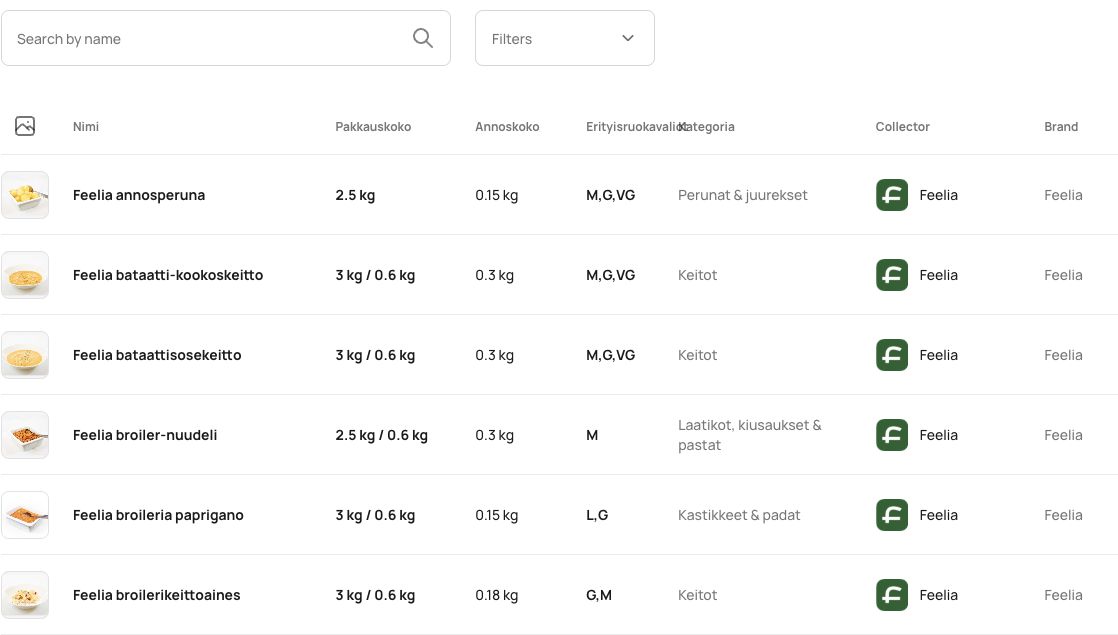
The Feelia FERP administration catalogue with products, pack sizes and categories
From our portfolio: the product catalogue in Feelia’s ERP system.

What we can build into your ERP system

Warehouses and inventory
Check stock by warehouse and bin, and trace each transfer.
Orders and sales
Record in-store sales and view online orders from the same administration panel.
Catalogs and customer pricing
Maintain products, barcodes and agreed prices for trade customers.
Documents and reporting
Review sales, documents and inventory movements. Connect accounting software where needed.
ERP for optical retailers
We have built an ERP system for an optical retailer. For specialist projects, we map how your team works and set access by role.
Data exchange with other systems
Exchange products, stock levels and orders with online stores and other systems.

Let’s discuss your ERP system

Tell us where your team loses time today. We can discuss whether Cloud ERP fits or you need a system built around your operations.

An example workflow in Cloud ERP

  1. Locate stock

    Check availability and find the exact warehouse location.

  2. Record the sale

    Scan the item in a physical store and complete the sale in Cloud ERP.

  3. Update online quantities

    With stock exchange enabled, updated quantities are sent to Webixty.

Integrations with your existing software

We review the systems you already use and agree which data needs to move between them and where each record is maintained.

Microsoft Dynamics

We build adapters to exchange data between online stores and Microsoft Dynamics. The scope depends on your implementation.

GS1 Synkka

We have built an integration with this Finnish service for exchanging product data between trading partners. About GS1 Synkka

Cloud ERP features

Product catalog and stock
  • Find items by name, product reference, EAN, or barcode.
  • View prices with and without VAT, stock quantities, and product status.
  • Filter a large catalog by category, brand, stock availability, or status.
Warehouse locations and moves
  • Map cabinets, racks, shelves, and positions around your physical space.
  • Search by code to highlight the item location on the warehouse layout, such as rack A, shelf 2, box 17.
  • Move numbered boxes with their contents. The history shows the old and new locations, who moved them, and when.
In-store sales
  • Find an item by QR code, ERP ID, or product code and add it to the current sale.
  • Review the items and complete the sale and payment in Cloud ERP. Stock is updated in ERP.
  • When stock exchange is enabled, the updated quantity is sent to Webixty separately from the sales record.
Standard online orders
  • Cloud ERP shows standard online orders as reference copies. In-store sales can also appear as reference copies in the connected store.
  • Check the source, total, status, and payment. A live connection lets you open the original from its copy.
  • Manage status, payment, and shipping in the system where the order was created. Changes update the same reference copy.
  • Standard orders are shared across all statuses. Stock is updated by the system that processes the sale.
Synchronization, permissions, and history
  • Connect the store from Cloud ERP and confirm access with a Webixty administrator account.
  • Set separate read and write permissions for products, categories, options, and standard orders. Stock updates run separately from other product data.
  • Load permitted data in the background and track progress. Resume an incomplete load after the issue is resolved.
  • Review the direction, operation, record, and result in the exchange history. Roles control who can use the scanner, warehouse tools, and admin panel.
Implementation and other software
  • Agree which data to load first, where the catalog and stock will be maintained, and who can change it.
  • Configure the cloud environment and roles. Check representative workflows for finding stock, recording a sale, and exchanging data with the store.
  • Webixty has a built-in Cloud ERP connection. For other software, we review the available API and agree the integration scope separately.